
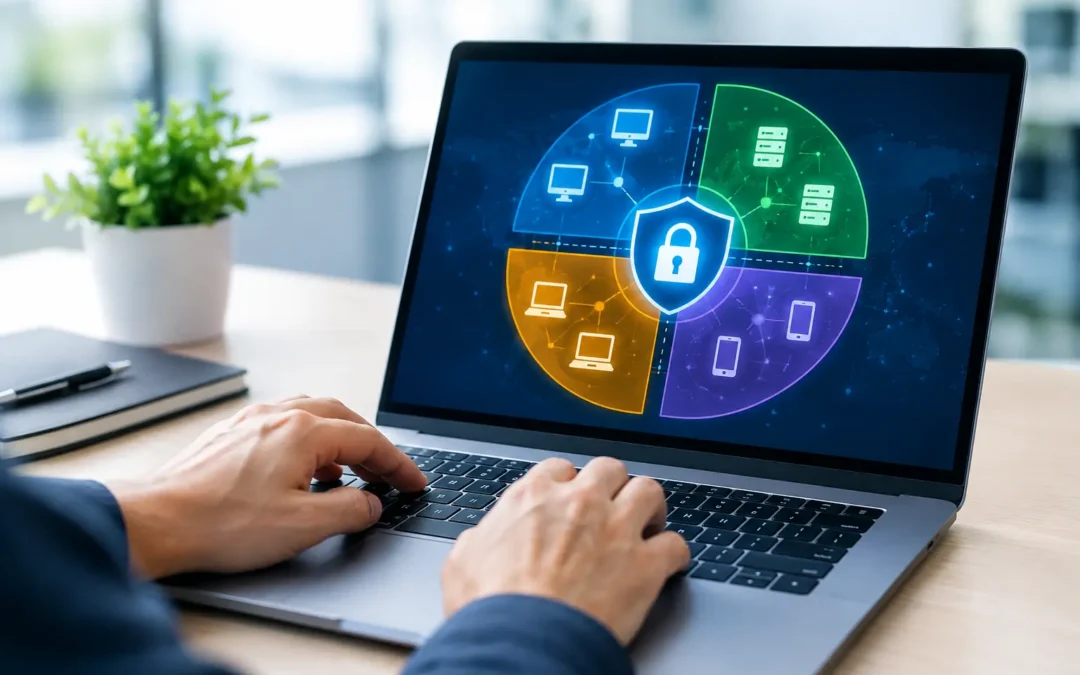
A single compromised password should not give an attacker a path to every computer, server, camera, and business application your company relies on. That is the core reason to ask, what is network segmentation: it is a practical way to contain a problem before it becomes a business-wide disruption.
For many small and mid-sized businesses, the network grows organically. A new server is added, Wi-Fi expands to accommodate staff and guests, security cameras come online, and cloud-connected devices appear across the office. Without intentional boundaries, those systems can all communicate far more freely than they need to. Network segmentation puts those boundaries in place.
What Is Network Segmentation?
Network segmentation is the practice of dividing a larger computer network into smaller, controlled sections. Each section, often called a segment or zone, contains systems with similar functions, risk levels, or access requirements. Rules then determine what traffic is allowed to move between those segments.
Think of it as access control inside your building. A visitor may be allowed into a lobby, but not into a records room, executive office, or network closet. Network segmentation applies the same logic to technology. An employee workstation may need access to a file server and approved cloud services, but it should not automatically be able to connect to a security camera system, backup appliance, or payroll database.
Segmentation is commonly created through virtual LANs, firewall rules, access control lists, separate Wi-Fi networks, and identity-based security policies. The tools matter, but the strategy matters more: every connection between systems should have a clear business purpose.
Why Network Segmentation Matters to Your Business
The biggest benefit is containment. Cybercriminals often gain their first foothold through a phishing email, stolen login credentials, unpatched device, or compromised remote connection. Once inside a flat network, they may attempt to move laterally from one system to another until they reach valuable data or critical infrastructure.
Segmentation makes that movement harder. If a workstation is compromised, well-designed controls can prevent it from reaching your accounting system, production servers, backup environment, or other sensitive areas. The incident may still require attention, but its potential impact is significantly reduced.
This approach also supports business continuity. Ransomware can spread quickly when devices share broad, unrestricted access. Isolating systems helps limit the blast radius and can protect the backups and management tools needed for recovery. For an organization that depends on technology to serve clients, process transactions, manage projects, or meet deadlines, reduced downtime is a meaningful business advantage.
Segmentation can also improve day-to-day performance and management. Separating guest Wi-Fi from internal operations, for example, keeps visitor devices from competing with business-critical traffic or accessing internal resources. Isolating voice, video, and other bandwidth-sensitive services can make their performance more predictable.
For healthcare, financial services, legal organizations, government entities, and other regulated businesses, segmentation provides an additional layer of support for protecting sensitive information. It does not replace compliance requirements, encryption, endpoint protection, or employee training. It does, however, show that access to systems and data is being intentionally controlled.
Common Network Segments
The right design depends on your operations, applications, and risk profile. Still, many businesses benefit from separating a few common categories of technology.
Employee devices and business systems
Employee computers generally need access to shared applications, printers, file storage, and internet services. They should not have unrestricted access to every device on the network. A separate server or application segment can allow the necessary connections while limiting unnecessary exposure.
Guest and public Wi-Fi
Guest Wi-Fi should be isolated from internal resources. Visitors, vendors, and personal devices can access the internet without gaining a route to company computers, shared folders, printers, or specialized equipment. This is one of the most straightforward and valuable segmentation measures for offices, clinics, and professional service firms.
Internet of Things and building devices
Security cameras, door access systems, smart TVs, conference room equipment, environmental sensors, and similar devices are often overlooked security risks. Many have limited security features, inconsistent update support, or default settings that are never changed. Placing them in a dedicated segment limits what a compromised device can reach.
Sensitive data and critical servers
Systems holding financial records, client files, protected health information, engineering data, or line-of-business applications deserve tighter controls. Access should be limited to authorized users and the systems that genuinely need it. Administrative tools and backup infrastructure often need their own protected zones as well.
How Segmentation Works in Practice
A segmented network is not simply a collection of separate Wi-Fi names or cables. The essential component is policy enforcement between segments. A firewall or similar control evaluates traffic moving from one zone to another and permits only what is required.
For example, staff devices may be allowed to reach an application server using a specific approved service. They may not be allowed to initiate connections to the server’s administrative interface. The guest network may reach the internet but be blocked from every internal segment. A camera management workstation may communicate with cameras, while ordinary employee computers cannot.
This principle is often called least privilege. Rather than allowing everything and blocking only known risks, the network allows necessary communication and restricts the rest. It requires more planning upfront, but it creates a clearer, more defensible environment over time.
Modern segmentation can go beyond physical location. An employee working remotely, a laptop in the office, and an approved managed mobile device may receive different levels of access based on identity, device health, role, and the sensitivity of the resource being requested. This is especially useful for organizations with hybrid teams, multiple offices, or cloud-based applications.
Network Segmentation Is Not One-Size-Fits-All
The goal is not to create as many segments as possible. Excessive complexity can create its own operational problems. If users cannot reach the applications or devices they need, productivity suffers and teams may look for unsafe workarounds.
A small professional office may begin with internal business systems, guest Wi-Fi, and a separate segment for cameras or other connected devices. A larger organization may need dedicated zones for departments, servers, voice systems, development environments, backup platforms, and third-party access. A healthcare practice may prioritize clinical systems and protected information, while an architecture firm may focus on protecting large design files, project systems, and specialized workstations.
The right approach depends on what data you hold, which systems are essential, who needs access, and what would happen if a device were compromised. Segmentation should support the way your business works, not force your business into an impractical design.
Signs Your Network May Need Better Segmentation
If every employee device can see every shared resource, the network may be too open. The same concern applies when guest Wi-Fi uses the same network as staff, security cameras are connected alongside business computers, or vendors receive broad remote access to resolve a single issue.
Other warning signs include unmanaged devices appearing on the network, unclear ownership of firewall rules, backups accessible from ordinary workstations, and an inability to explain which systems can communicate with each other. These conditions do not guarantee a security incident, but they give an attacker more opportunities if one occurs.
A business does not need a major breach to justify improvements. Reviewing segmentation during an office move, network equipment refresh, cloud migration, compliance initiative, or growth phase is usually more cost-effective than redesigning the environment during an emergency.
A Practical Path to Better Segmentation
Start by documenting what is connected to the network. This includes workstations, servers, wireless access points, printers, phones, cameras, network equipment, cloud-connected appliances, and remote access tools. Many organizations discover devices they had forgotten were present.
Next, identify what is critical. Consider the systems that store sensitive data, generate revenue, support client service, or enable recovery after an outage. Then map who and what needs access to those systems. This turns segmentation from a technical exercise into a business decision.
From there, create a phased plan. Guest Wi-Fi isolation and separation of unmanaged devices are often quick wins. Protecting servers, administrative access, and backups may take more coordination because application dependencies need to be tested carefully. Changes should be documented, monitored, and reviewed as your environment changes.
A trusted IT partner can help assess the current network, identify unnecessary exposure, and implement controls without disrupting normal operations. For Central Florida businesses, ITIT approaches segmentation as part of a broader strategy that supports security, reliability, and growth.
The most useful question is not whether your network has a firewall. It is whether a single compromised device can reach more of your business than it should. Answering that question clearly is the first step toward a network that is easier to manage, harder to compromise, and better prepared to keep your business moving.